




Loading...

BETA

Onboarding

Account

Question 1

A restaurant owner holding a menu at a Caribbean storefront

Sign in to set up a restaurant

Create an account or sign in. Then choose a plan and add your menu.

Log in Sign up

Primary admin

Your account email

Add to Home Screen

Step 1 of 4

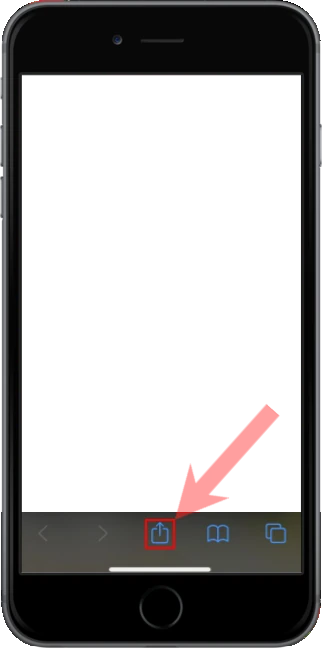
Tap Share in Safari

Open this site in Safari (not Chrome or Instagram). Tap the Share button, a square with an arrow pointing up, in the toolbar at the bottom of the screen.

Safari toolbar with the Share button at the bottom of the screen

Step 2 of 4

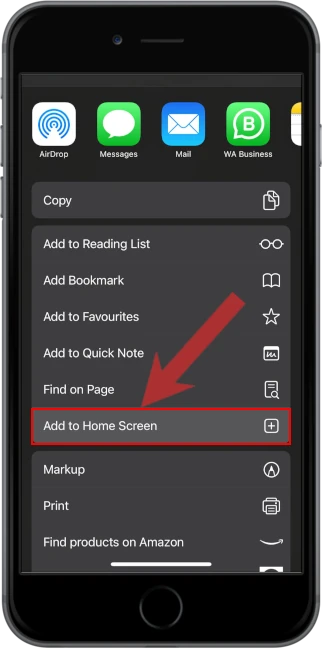
Tap Add to Home Screen

In the share sheet, scroll if needed, then tap Add to Home Screen. It is below Find on Page.

iOS share sheet with Add to Home Screen

Step 3 of 4

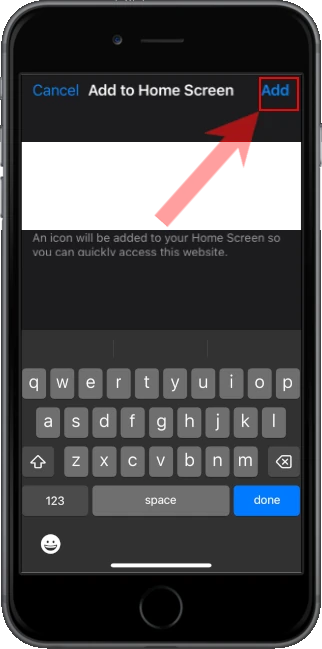
Tap Add

Check the name, then tap Add in the top right. iOS puts the icon on your Home Screen.

Add to Home Screen confirmation with Add in the corner

Step 4 of 4

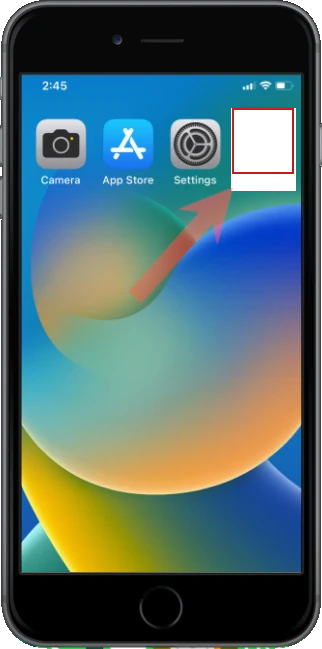
Open it from the Home Screen

Leave Safari and tap the new icon like any other app. Alerts and full-screen mode only work from that icon.

Home Screen with the installed app icon